AWS OpenSearch Migration Assistant: What It Really Does
AWS OpenSearch Migration Assistant: What It Actually Does, and When to Skip It
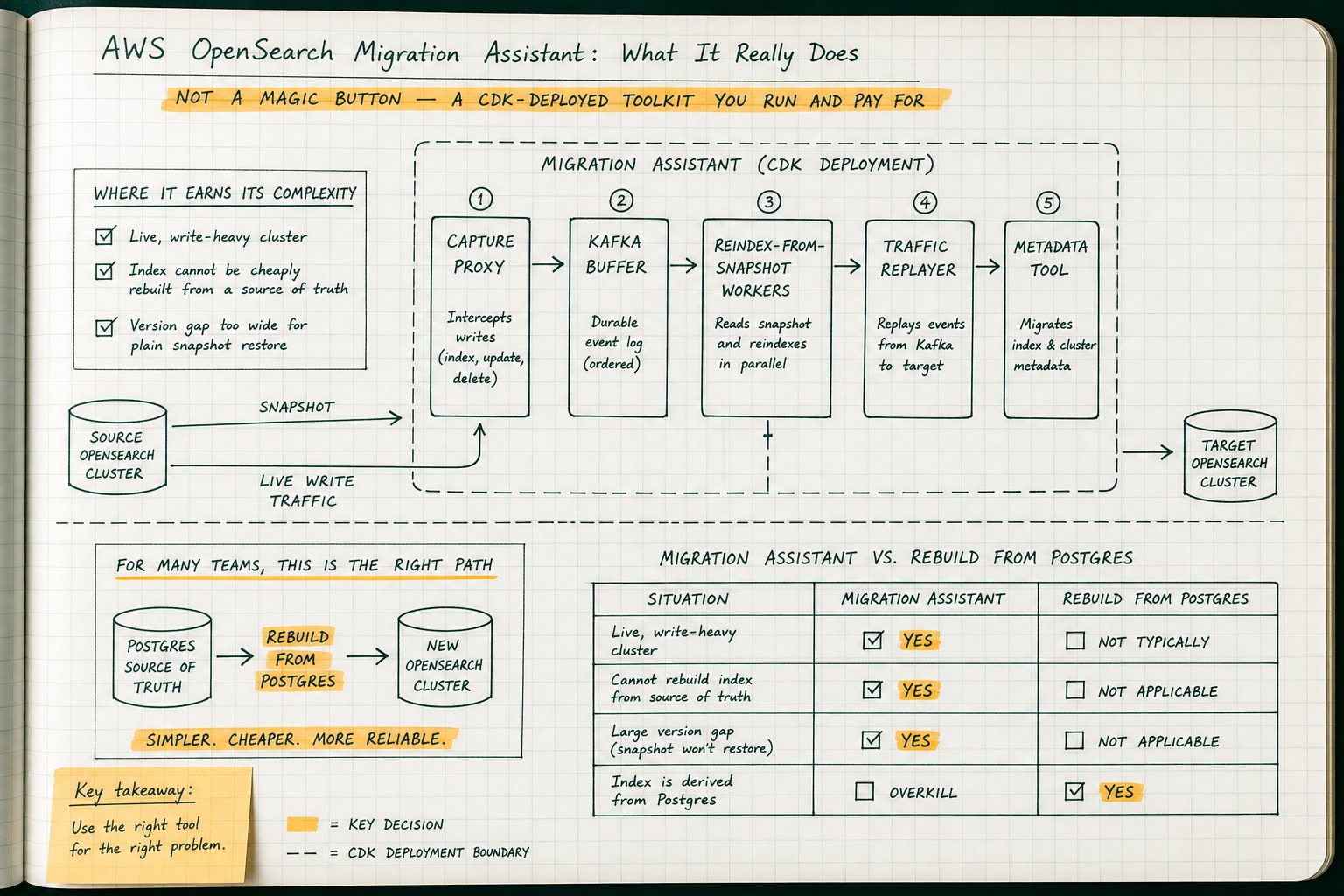
Migration Assistant for Amazon OpenSearch Service is not a managed service — it’s a CDK app you deploy into your own account, and you own everything it stands up. Before your team commits to it for an elasticsearch to opensearch migration or a version jump, you should understand the architecture, the cost surface, and the one production change (repointing clients at a capture proxy) that decides whether the whole thing works.
I’ve been through a cross-major search migration that involved two weeks of reindexing, a traffic replayer that fell behind because the speedup factor was set too aggressively, and a Slack thread titled “why is target search latency 4x source.” None of that was Migration Assistant’s fault — it did what it was built to do. The mistake was not reading the architecture closely enough before signing up to operate it.
It’s a CDK deploy, not a console button
Migration Assistant is published in the AWS Solutions Library, and you deploy it into your own AWS account with AWS CDK. There is no button for it in the Amazon OpenSearch Service console and no managed control plane babysitting it. You get a CDK app that stands up a set of containers, a Kafka cluster, and a console host inside your VPC — and from that moment you’re paying for all of it and you’re on the hook for tearing it down. The underlying code lives in the opensearch-project/opensearch-migrations repository on GitHub under Apache 2.0, which is genuinely useful because when something behaves oddly at 2am you can read the source instead of filing a ticket.
That framing matters more than any feature list. Teams treat “AWS Solution” as a synonym for “managed service,” then discover three weeks later that they have an MSK cluster nobody budgeted for and a Fargate service quietly consuming vCPU quota. If you’re picturing something closer to DMS with a friendly wizard, recalibrate: this is closer to standing up a small distributed system to move another distributed system.
The five moving parts
Migration Assistant Console. A host you shell into that provides the console CLI. Everything you do in a migration goes through it: metadata evaluation, backfill start and scale, replayer control, status checks. It’s small, it’s cheap, and it runs the whole time.
Capture Proxy. This is the component with real production blast radius. It sits in the request path between your clients and the source cluster, forwards traffic through, and records it. To make it work, clients have to be repointed at the proxy. That’s a production change, and it happens before a single document has moved anywhere.
Kafka buffer on Amazon MSK. Captured requests land in Kafka rather than being replayed inline. Decoupling capture from replay is the right call architecturally: the replayer can be down, slow, or not yet started, and capture continues. It also means you’re running an MSK cluster with retention settings that had better outlast your backfill.
Traffic Replayer. Reads captured requests out of the buffer and replays them against the target cluster. The OpenSearch traffic replayer can run faster than real time with a configurable speedup factor, which is how the target catches up after the backfill finishes. It can also give you source and target responses for comparison — the one capability nothing else on this list provides.
Reindex-from-Snapshot (RFS) workers. ECS Fargate tasks that read documents out of an S3 snapshot and bulk-index them into the target. This is the bulk data mover and the most technically interesting piece of the solution.
Metadata migration tool. Handles templates, aliases, and index settings, with a dry run mode so you see what will be transformed or dropped before you commit.
Cost surface, plainly: MSK brokers, Fargate task-hours, S3 snapshot storage, and the console host, for the entire duration. None of it stops charging when the migration succeeds. The implementation guide has a cleanup section for a reason.
The happy path, phase by phase
The canonical zero-downtime sequence, in order:
- Deploy the solution with CDK into the VPC that can reach both source and target.
- Repoint clients at the Capture Proxy. First real production change.
- Start capture. From here, writes are being buffered.
- Take a snapshot of the source into S3.
- Dry run the metadata migration:
Read the output properly. It tells you what would be migrated and what would be transformed or dropped.console metadata evaluate - Run it for real:
console metadata migrate - Start the backfill and scale it:
console backfill start console backfill scale 12 - Start the replayer with a speedup factor once backfill is done, so buffered writes catch up.
console replay start - Validate. Document counts, spot-check queries, compare responses.
- Cut clients to the target.
- Tear everything down.
Step 2 is where migrations go sideways. It sounds trivial in a runbook and it isn’t. You have to enumerate every client that writes to or reads from the source cluster, change its endpoint, and redeploy it. In a mature environment that list includes services you forgot existed: a nightly batch loader, a data science notebook with a hardcoded VPC endpoint, an admin script somebody runs from a bastion, a cross-account consumer.
Anything that reaches the source without passing through the proxy is invisible to the replayer. It won’t error. It will simply be missing from the target, and you’ll find out when a customer notices. That’s a direct consequence of the proxy-based capture design, not a bug, and no amount of tuning fixes it. Your inventory of clients is the migration.
Reindex from snapshot vs. remote reindex
Here’s the mechanical constraint everything else follows from. Lucene reads index files written by the immediately preceding major version and no further back. A snapshot from a cluster two or more majors behind your target cannot simply be restored, because the target’s Lucene can’t read those segments. This is why the classic answer to a wide version gap is a chain of intermediate upgrades, each one a full cluster migration with its own risk.
The traditional escape hatch is remote reindex, where the target pulls documents from the source over HTTP. Amazon OpenSearch Service supports it, and it works. But it reads from the live source cluster, so all of that read load lands on the machines currently serving your production queries. It’s single-threaded per request unless you slice it. And it doesn’t capture writes that arrive after the reindex begins, because it operates against a point-in-time view of the source.
RFS sidesteps both problems. Reindex from snapshot in OpenSearch reads documents out of the snapshot in S3 and bulk-indexes them into the target. Because it re-indexes documents rather than restoring segments, the target builds its own Lucene structures with its own code, and the version gap stops being a Lucene problem. Once the snapshot exists, the backfill places no query load on the source at all — your production cluster keeps serving traffic while the copy happens against object storage. When you’re weighing opensearch remote reindex vs snapshot restore, this decoupling of the version-gap problem from the live-load problem is the deciding factor.
Two constraints you can’t negotiate around
_source must be enabled. RFS re-indexes documents, so it needs the documents. An index with _source disabled cannot be migrated this way. Check this before you plan anything, because the fix is “reindex on the source first,” which is a project of its own.
Parallelism is bounded by shard count. Work is distributed at the shard level and scaled with console backfill scale. A 900GB index with four shards won’t go faster because you asked for thirty Fargate tasks. Look at your shard layout before you promise anyone a timeline.
Four honest reasons to use it
- Your version gap is wider than one major, so plain snapshot restore is off the table.
- Your index can’t be rebuilt from a source of truth inside an acceptable window.
- You have continuous writes you can’t pause and can’t replay yourself.
- You need response-level source-versus-target comparison to de-risk a behaviour change.
If fewer than two of those apply to you, don’t deploy this. You’re adding MSK, Fargate, a proxy in your write path, and a CDK stack to solve a problem you could solve with a shell script and some patience.
The Postgres-shop case, said out loud
A large share of the teams reaching for Migration Assistant for Amazon OpenSearch Service have a cluster that’s really just a derived projection of Postgres. The documents are built by CDC through logical decoding and Debezium, or by a batch indexer running a query on a schedule, or by application code dual-writing on commit. In every one of those architectures the index is reproducible. Postgres is the source of truth, the search cluster is a cache with a query language.
If that describes you, the correct migration is: stand up the new cluster, point your indexer at it, rebuild, verify, cut over, delete the old one. No proxy in your write path. No Kafka. No version-gap problem, because you’re writing fresh documents with current client libraries. No _source prerequisite. And you finish with something more valuable than a migrated cluster: a tested, timed rebuild procedure you’ll need again the next time someone changes an analyzer, fixes a mapping mistake, or spins up a new environment.
Do the arithmetic before deciding. Measure two numbers on a staging pair:
- Read rate from Postgres. Chunk by primary key range with keyset pagination, not
OFFSET. Run N workers against N disjoint ranges. Measure rows/sec per worker at a concurrency your primaries or read replicas actually tolerate — this is also a good moment to watch query plans and lock contention with whatever monitoring you already run against Postgres (a query-level tool like MyDBA can save you from guessing here). - Index rate into OpenSearch. Bulk requests, measured in docs/sec per worker at your real document size and mapping complexity.
Then: total_documents / (workers x docs_per_second_per_worker) = seconds.
Sixty million documents, eight workers, 4,000 docs/sec each, is 32,000 docs/sec, or roughly 31 minutes of wall clock. Even at a tenth of that throughput you’re under six hours. Compare that to two weeks of Migration Assistant work plus the MSK bill plus a proxy in front of production. The comparison usually isn’t close.
The honest caveat: if your indexer’s per-document work is expensive (multiple joins, external enrichment calls, embedding generation) your read rate may be far lower than your bulk index rate, and the arithmetic can turn against you. That’s exactly why you measure instead of assuming. If your enrichment queries are the bottleneck rather than OpenSearch, the fix lives in Postgres, not in a CDK deploy.
The alternatives, ranked
| Approach | Version gap tolerance | Load on source | Handles live writes | Operational surface | Rough cost |
|---|---|---|---|---|---|
| Snapshot restore | One major back only (Lucene rule) | None once snapshot taken | No | Very low | S3 storage only |
| Remote reindex | Wide, target does the indexing | High, reads live source | No, point-in-time view | Low | Cluster capacity you already own |
| Rebuild from source of truth | Irrelevant, fresh writes | None on old cluster; load on Postgres | Yes, indexer keeps running | Low to medium, uses existing pipeline | Compute you already run |
| Application dual-write plus backfill | Irrelevant | None on old cluster | Yes, by construction | Medium, app changes and rollback plan | Development time |
| Migration Assistant | Widest, RFS decouples it | None once snapshot taken | Yes, capture plus replay | High: proxy, MSK, Fargate, console | MSK plus Fargate plus S3 plus console, for the duration |
Gotchas nobody puts in the runbook
- Indices with
_sourcedisabled. Audit for this on day one, not in week three. - Auth header rewriting. Source and target rarely share an auth model. Captured requests carry the source’s headers and the replayer has to present something the target accepts.
- Non-idempotent requests during replay. Anything using scripted updates, counters, or auto-generated IDs behaves differently when replayed. Enumerate these before the replayer runs.
- Traffic bypassing the proxy. Covered above. It’s the single most common cause of silent data loss.
- MSK retention shorter than your backfill. If backfill takes five days and retention is three, you’ve thrown away the writes you needed. Set retention against your worst-case backfill estimate, then add margin.
- ISM policies and index templates. Run
console metadata evaluateand actually read the transformed-or-dropped list. Lifecycle policies and templates are the usual casualties. - Fargate task limits. Account-level task and vCPU quotas will cap
console backfill scalebefore your shard count does. Request the increase early; approval isn’t instant.
A risk playbook, not a plan
Borrow the KNOWN_GAPS pattern. Before you start, create a document listing every mismatch you already expect between source and target, and for each one record a decision: fix it in place, or ship it and tell people.
Analyzer differences that change tokenisation. Mapping type coercions where a field was long and is now keyword. Deprecated field types with no clean equivalent. Scoring changes from a different similarity default. Write down which of these you’ll chase and which you’ll accept, and get the search product owner to sign it.
The value isn’t the list. It’s that when validation surfaces a discrepancy at 11pm, the decision has already been made by people who were awake and unhurried. Migration plans that only describe the happy path are how teams end up rolling back for a difference that was always going to be there and was always acceptable.
Checklist: is Migration Assistant right for this cluster?
Paste this into a ticket and answer honestly.
- Is your version gap wider than one major, ruling out snapshot restore?
- Is
_sourceenabled on every index you need to migrate? - Can you enumerate every client that touches the source cluster, including batch jobs and cross-account consumers?
- Can you repoint all of them at the Capture Proxy in a controlled window?
- Is your index genuinely irreproducible from a source of truth?
- Do your indices have enough shards for RFS parallelism to matter?
- Have you priced MSK, Fargate, S3 snapshot storage, and the console host for the full expected duration, with margin?
- Is MSK retention set longer than your worst-case backfill?
- Do you have a written owner and date for tearing the stack down?
- Do you actually need response-level source-versus-target comparison, or does a document count and a query spot-check satisfy you?
If you answered “no” to questions 1 and 5, or “no” to question 10, you don’t need this tool — build the rebuild pipeline instead. You’ll use it more than once.
The RFS design is a real piece of engineering, and traffic capture is the only honest way to migrate a cluster you can’t stop writing to. Just be sure that describes your cluster before you deploy it.