Elasticsearch Architecture: Cluster, Node, Index & Shard
Elasticsearch for Postgres DBAs: Cluster, Node, Index, Shard
Why a Postgres DBA is reading this at all
Someone at your company stood up Elasticsearch three years ago to power the site search box. That person left. The cluster stores data, so it got handed to whoever owns the databases. That’s you.
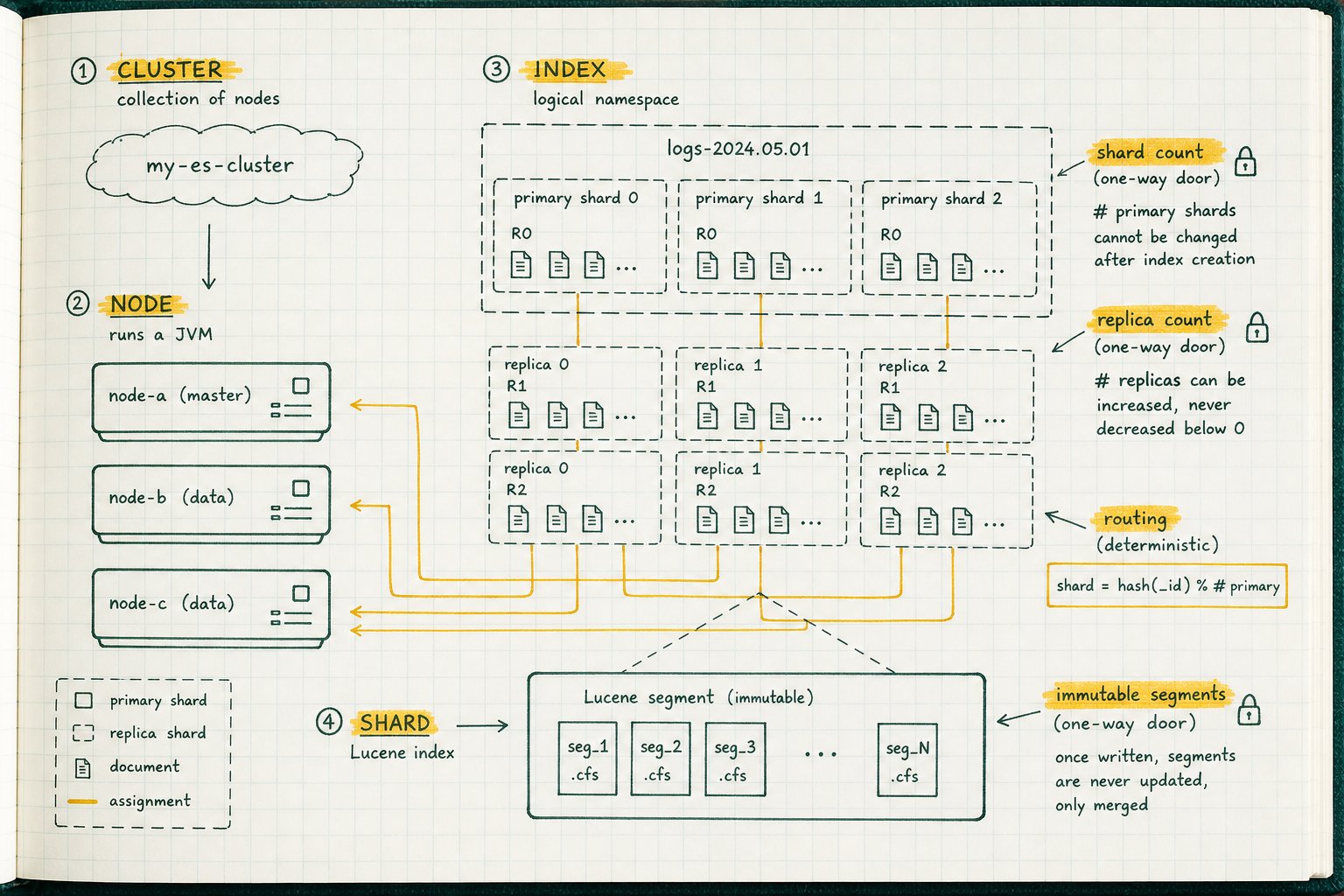
You know Postgres. You know WAL, MVCC, pg_stat_activity, and how to read EXPLAIN output at 2am. None of that transfers cleanly, because Elasticsearch reused Postgres’s vocabulary and gave the words different jobs. Three of the most common terms, cluster, index, and replica, do not mean in Elasticsearch what they mean in Postgres. Not “similar with caveats.” Genuinely different concepts wearing the same name, and that vocabulary collision is the single biggest reason inherited search clusters get misconfigured.
- Cluster. In Postgres, a database cluster is a single collection of databases managed by one server instance, stored under one data directory created by
initdb. One machine, one process, several databases. In Elasticsearch, a cluster is a set of separate machines that have agreed to coordinate. - Index. In Postgres, an index is an auxiliary structure that speeds up lookups on a table. In Elasticsearch, an index is the data. It is closer to a table.
- Replica. In Postgres, a replica is a whole standby instance following a primary via WAL. In Elasticsearch, a replica is a copy of one shard, and a single node holds primaries for some shards and replicas for others at the same time.
Get those three straight and the rest follows. By the end of this you should be able to read GET _cluster/health and GET _cat/shards?v and know whether you have a problem or a false alarm.
Everything here assumes a modern 8.x or 9.x cluster. I’ll flag the behaviours that changed in 7.0 and later, because a lot of the blog posts you’ll find while googling predate them. If you’re inheriting something running 6.x with minimum_master_nodes still set, or default 5-shard indices, treat that as inherited technical debt, not house style.
The one-paragraph map
A cluster is a set of nodes that agree they belong together. A node is one Elasticsearch process (one JVM). An index is a named collection of JSON documents with a mapping that describes their fields. An index is physically cut into shards. Each shard is a complete, self-contained Apache Lucene index. Each Lucene index is a pile of immutable segments on disk. That’s the whole hierarchy. Everything below is elaboration.
What is an Elasticsearch cluster, and why isn’t it a Postgres cluster?
Nodes join a cluster by sharing the same cluster.name setting and finding each other through configured seed hosts. Once they’ve found each other, they elect a master node. The master maintains cluster state: the list of nodes, the index metadata and mappings, the settings, and the routing table that says which shard copy lives on which node.
The master publishes that state to every other node. This matters operationally, because cluster state is the thing that gets you at scale. Ten thousand tiny indices with fat mappings produce a huge cluster state that has to be published on every change, and a master node that spends its life doing that becomes the bottleneck long before disk or CPU does.
The nearest Postgres analogue for an ES cluster isn’t a Postgres cluster at all. That word is a false friend here, and you should ignore it entirely when reasoning about Elasticsearch. It’s closer to a Patroni deployment or a Citus cluster: multiple instances, coordinated membership, an elected leader. Where the analogy breaks is that Patroni pushes consensus out to etcd or Consul, while Elasticsearch runs its own coordination layer internally. There’s no external DCS to inspect when things go wrong.
What is a node, and what do node roles actually do?
One JVM process is one node. You can run several on a box, and people do on large hardware, but each one is a distinct cluster member.
Responsibilities come from the node.roles setting, which replaced the old node.master / node.data booleans in 7.9. The roles you’ll see:
master: eligible to be elected master and hold cluster state.data: holds shards. Also the tier-specific variantsdata_content,data_hot,data_warm,data_cold,data_frozen.ingest: runs ingest pipelines before documents are indexed.ml,transform: machine learning jobs and transforms.remote_cluster_client: can talk to remote clusters for cross-cluster search.
Set node.roles: [] and you get a coordinating-only node. But note that every node coordinates. Whichever node receives a client request becomes the coordinating node for that request: it fans the query out to the relevant shards, then reduces the responses before answering. Coordinating isn’t a role you opt into. It’s what any node does when it’s the one a client happened to hit.
Distributed search runs in two phases, query then fetch. The coordinating node first collects matching document ids and sort values from every shard, works out the true top N, then fetches the full documents for only those results. That’s why deep pagination hurts so much: page 500 still requires every shard to return 5000 sorted ids.
The practical rule: small clusters run every role on every node and that’s fine. Once you’re past roughly a dozen data nodes, or your master is visibly busy under GET _cat/nodes?v, split the masters out onto dedicated, lightly-loaded nodes.
GET _cat/nodes?v
ip           heap.percent ram.percent cpu load_1m node.role   master name
10.4.2.11              41          97   7    1.83 himrst      *      es-master-a
10.4.2.12              38          96   5    1.44 himrst      -      es-master-b
10.4.2.13              40          96   6    1.02 himrst      -      es-master-c
10.4.2.21              67          99  38    5.61 hist        -      es-data-01
10.4.2.22              71          99  44    6.02 hist        -      es-data-02
10.4.2.23              64          99  35    4.88 hist        -      es-data-03
The node.role column is a set of single letters. The asterisk in the master column marks the currently elected master, not merely an eligible one.
How many master-eligible nodes do I need, and what happened to split brain?
Three. For anything you care about, three. Never two.
Master election is quorum-based through the voting configuration. Old guides tell you to set discovery.zen.minimum_master_nodes to (n/2)+1 by hand. That setting was removed in 7.0, precisely because operators kept setting it wrong: usually by picking a value that couldn’t actually prevent split brain, or by forgetting to update it after adding nodes. The coordination layer manages the voting configuration itself now.
Two master-eligible nodes is the worst configuration available. Lose either one and you have no quorum, so the cluster stops accepting writes. Three tolerates one failure. If you already run Patroni on etcd, this is the same argument you’ve already had about running three etcd members instead of two. An even-numbered or two-node quorum group is a liability, not a cost saving.
What is an index? (Not the thing you think it is)
This is the section that fixes the most bugs.
An Elasticsearch index is a logical grouping of JSON documents with an associated mapping. Documents are rows. Fields are columns. The mapping is the schema: field names, types, and how text gets analyzed into searchable terms.
Three things bite Postgres people here:
Dynamic mapping invents a schema for you. Index a document with a field nobody declared and Elasticsearch guesses a type and adds it. Convenient in dev, and the reason your production mapping has user.metadata.session.attributes.click_47 in it.
Mappings are largely immutable. You can add new fields. You generally cannot change the type of an existing one (text doesn’t become keyword in place) or change the analyzer, without reindexing into a new index. There’s no ALTER TABLE ... TYPE. Decide the analyzer for a text field carefully, because you’re deciding it once.
There’s a field limit. index.mapping.total_fields.limit defaults to 1000. Unchecked dynamic mapping plus a payload with arbitrary keys, a common failure mode with poorly-bounded JSON blobs or metadata dictionaries, produces the classic mapping explosion: the field count climbs, cluster state bloats, and eventually indexing fails outright. If your documents carry user-supplied keys, use the flattened field type or turn dynamic mapping off for that subtree.
One opinion, offered freely: put an alias in front of every index from day one. Applications should talk to orders, which points at orders-000004. Reindexing then becomes an atomic alias swap instead of a coordinated application deploy. Hardcode the index name and you’ve created a one-way door for no reason.
What is a shard, and why can’t I change the number later?
A shard is a complete, independent Lucene index. Not a slice of one. A complete one. An index of 3 primary shards isn’t one big data structure split three ways at query time. It’s three entirely separate Lucene indexes that happen to share a name and a mapping.
Here’s the routing rule, in words: Elasticsearch picks a document’s shard by hashing its routing value (the _id by default) and taking that hash modulo the number of primary shards.
Sit with that formula for a second and the immutability rule derives itself. The divisor is baked into where every document already lives. Change the primary count from 3 to 4 and the modulo changes, and the formula now points every existing document at the wrong shard. There’s no way to “just add a shard” without physically relocating data according to a different formula, so Elasticsearch doesn’t let you try. That’s why index.number_of_shards is a static setting, fixed at index creation. index.number_of_replicas, by contrast, is dynamic. You can change it on a live index any time, because replica count doesn’t affect the routing math at all.
Since 7.0 the default is 1 primary shard (it was 5 in 6.x) with 1 replica. If you inherited an index created in the 6.x era, expect five primaries whether or not the data justifies it. That’s 6.x defaults talking, not a deliberate sizing decision.
Escape hatches exist, with conditions:
- Reindex into a fresh index with whatever count you actually want, cutting over via an alias.
- Split API to increase the shard count, but only by a factor that evenly divides the original count.
- Shrink API to decrease it, to a factor of the original.
Split and shrink both require blocking the source index for writes first. Neither is an online operation. Reindex plus an alias swap is the honest answer most of the time.
Primary vs replica shards: what’s the difference?
Writes go to the primary shard, which then replicates to its in-sync replicas. Searches are served by primaries and replicas, so adding replicas buys read throughput as well as redundancy. A replica is never allocated on the same node as its primary, that would defeat the point entirely, which means an index with one replica needs at least two nodes for everything to be assigned.
Worked example. Index orders with 3 primaries and 1 replica, on three nodes. That’s 6 shard copies, 2 per node:
GET _cat/shards/orders?v
index  shard prirep state   docs  store node
orders 0     p      STARTED 41233  1.2gb es-data-01
orders 0     r      STARTED 41233  1.2gb es-data-02
orders 1     p      STARTED 40881  1.2gb es-data-02
orders 1     r      STARTED 40881  1.2gb es-data-03
orders 2     p      STARTED 41007  1.2gb es-data-03
orders 2     r      STARTED 41007  1.2gb es-data-01
Kill es-data-02. Shard 1’s primary is gone, so its replica on es-data-03 gets promoted to primary within seconds. Shard 0 loses a replica. Cluster goes yellow, not red, because every primary is assigned. Once the cluster decides the node isn’t coming back, it rebuilds the missing replicas on the two survivors and returns to green with no third node required.
Notice what this is not. There is no “the standby.” Streaming replication in Postgres means one server is primary and another is the replica, for everything, all the time. es-data-02 was holding a primary and a replica simultaneously. Elasticsearch replication is per-shard, not per-instance. Every node is a primary-holder for some data and a replica-holder for other data, at once.
Why is my cluster yellow?
Precisely:
- green: all primary and replica shards assigned.
- yellow: all primaries assigned, at least one replica is not.
- red: at least one primary is unassigned. Some of your data is unreachable right now.
GET _cluster/health
{
  "cluster_name" : "search-prod",
  "status" : "yellow",
  "number_of_nodes" : 1,
  "number_of_data_nodes" : 1,
  "active_primary_shards" : 3,
  "active_shards" : 3,
  "unassigned_shards" : 3,
  "active_shards_percent_as_number" : 50.0
}
The most common false alarm in all of Elasticsearch: a single-node cluster with the default one replica is permanently yellow, and that is expected. The replica cannot be placed on the same node as its primary, and there is no other node, so it stays unassigned forever. Nothing is broken.
Prove it rather than guessing:
GET _cluster/allocation/explain
{
  "index" : "orders",
  "shard" : 0,
  "primary" : false,
  "current_state" : "unassigned",
  "can_allocate" : "no",
  "allocate_explanation" : "Elasticsearch isn't allowed to allocate this shard to any of the nodes in the cluster.",
  "node_allocation_decisions" : [
    {
      "node_name" : "es-dev-01",
      "deciders" : [
        {
          "decider" : "same_shard",
          "decision" : "NO",
          "explanation" : "a copy of this shard is already allocated to this node"
        }
      ]
    }
  ]
}
Two legitimate fixes: add a second node, or set number_of_replicas to 0 on the dev index. Never do the latter in production, and never let it creep into a shared index template. You’d be trading your only redundancy for a green dashboard.
What’s inside a shard? Segments, refresh, and the vacuum you never asked for
Lucene segments are immutable. Once written, a segment is never modified.
New documents land in an in-memory buffer, plus the translog for durability between commits. They become searchable when a refresh writes a new segment. Deletes and updates are soft: delete a document and Elasticsearch doesn’t remove it, it marks it dead in its segment. An “update” is actually delete-old-plus-index-new. The dead entries sit there, taking up space, until the segments containing them get merged and the merge process drops what’s marked dead.
That should feel familiar. It’s the same shape as Postgres MVCC. An UPDATE writes a new tuple and leaves the old one dead until autovacuum reclaims it. Elasticsearch has dead documents and background merges. Same bloat dynamics, same read amplification when you neglect them.
The analogy breaks in one important place. Autovacuum is tunable per table and you can run VACUUM manually without much fear. Merging is largely automatic, and the manual equivalent, _forcemerge, behaves more like VACUUM FULL. Do not force-merge a live index. It rewrites the whole shard, produces enormous I/O, and merging down to one segment on an index that is still receiving writes leaves you with a giant segment that will never merge again. New writes immediately start generating small segments again, so you buy very little for the cost. Force-merge is for indices that are finished being written, such as yesterday’s rolled-over log index.
Why can’t I read what I just wrote?
Because search is near real-time, not real-time. The default index.refresh_interval is 1 second, so a document indexed at T+0 becomes searchable somewhere around T+1s. There’s also search-idle behaviour: an index nobody has searched recently stops refreshing in the background until a search arrives.
Options:
- Get API by
_idis realtime. It can go straight to the translog/in-memory buffer and returns the latest version even if it hasn’t been refreshed into a segment yet. ?refresh=wait_foron the write makes the client wait for the next scheduled refresh before responding. Correct choice for read-your-writes.?refresh=trueforces a refresh immediately. Fine in tests, a segment-generating machine in production.
Do not “fix” this by setting refresh_interval to 100ms cluster-wide. You’ll produce tiny segments faster than merging can consolidate them, trading an intermittent read-your-writes annoyance for constant background merge load.
The related trap: Elasticsearch gives you atomicity for single-document operations and optimistic concurrency control through if_seq_no and if_primary_term. There are no multi-document ACID transactions. If your app logic assumes “write three related documents, all or nothing,” Postgres will do that and Elasticsearch flatly won’t. Build for it explicitly rather than discovering it in production.
How big should a shard be?
Elastic’s published guidance, which is guidance and not law:
- Target shard sizes in the tens of gigabytes for most workloads: not hundreds of megabytes, not multiple terabytes.
- Aim for 20 or fewer shards per gigabyte of JVM heap on each node. A node with 30GB heap shouldn’t be holding much past 600 shards.
- Keep heap at or below 50% of RAM, and below the compressed-pointers threshold (commonly cited around 26 to 30 GB). Going past it silently makes every pointer bigger and effectively shrinks usable heap.
- Leave the remaining RAM to the filesystem cache, because Lucene reads segment files through it.
That last one is the same argument you’ve already had about shared_buffers. Nobody sensible sets it to 90% of RAM, because the OS page cache is doing real work. Elasticsearch is more extreme: heap holds structures, but the actual index data is read from the page cache, so starving it is worse than under-provisioning heap.
What about time-series data, indices per day or something smarter?
The old pattern was one index per day, logs-2026.08.04, with a cron job to create it and another to delete old ones. The modern answer is a data stream: an append-only abstraction over a set of hidden backing indices, with rollover and lifecycle transitions driven by an ILM policy. You write to logs-app-prod and Elasticsearch handles rolling over to a new backing index at a size or age threshold, moving it hot to warm to cold, force-merging it once it’s read-only, and deleting it at the end.
Postgres readers already have the mental model. This is declarative partition management: rollover is creating the next partition, ILM deletion is DETACH PARTITION plus DROP, and querying the stream instead of individual indices is partition pruning.
One operational hazard worth knowing before it finds you. Disk-based shard allocation has three watermarks: low at 85% (no new shards allocated here), high at 90% (shards get moved away), and flood stage at 95%, which applies a read-only-allow-delete block to indices with shards on that node. That’s how a disk-space incident becomes a read-only index and a wall of write failures. Since 7.15 the block is released automatically once usage drops back below the high watermark, so you no longer have to clear it by hand, but you should still alert at 80%.
The Postgres to Elasticsearch translation table
| Postgres | Nearest Elasticsearch concept | Where the analogy breaks |
|---|---|---|
Database cluster (one initdb data dir) |
Node | An ES cluster is many machines; a PG cluster is one instance |
| Patroni / Citus deployment | Cluster | ES runs its own coordination layer, no external etcd |
| Database | Index (loosely) | No real namespacing inside an index; aliases and index prefixes do that job |
| Table | Index | This is the accurate one, lean on it. It carries its own shard count, replicas and lifecycle policy |
| Row | Document | Documents are JSON with nested structure, not flat tuples |
| Column | Field in the mapping | Field types are near-immutable once set, and text fields are analyzed |
| Partition | Backing index in a data stream | Rollover is size/age based, not by key range |
| Index (B-tree, GIN) | Inverted index inside a Lucene segment | Not optional and not separately created; it is the storage |
| Streaming replica | Replica shard | Per-shard, not per-instance; one node holds primaries and replicas together |
| Dead tuples | Deleted documents in segments | Segments are immutable, so nothing is updated in place |
| autovacuum | Background segment merging | Far less tunable per index |
VACUUM FULL |
_forcemerge |
Even more dangerous on a live index |
| WAL | Translog | Per-shard, and not used for replication the way WAL is |
BEGIN / COMMIT |
Nothing | Single-document atomicity plus if_seq_no is all you get |
Several of these are approximations. The mapping/schema and replica rows in particular hide real differences. Use the table to orient yourself, not to reason about correctness.
The one-way doors
Decisions you cannot undo without a reindex:
- Primary shard count (
index.number_of_shards). Static. Routing math depends on it. - Field types and analyzers. You can add fields, not redefine them.
- The index name, if the application hardcoded it instead of using an alias.
- Whether you enabled dynamic mapping on a field tree that has since exploded past 1000 fields.
Safely dynamic, change them on a live index whenever you like:
index.number_of_replicasindex.refresh_interval- ILM policy attached to the index or data stream
- Allocation filtering and shard rebalancing settings
index.mapping.total_fields.limit(raising it is a stay of execution, not a fix)
Day one on an unfamiliar cluster
GET _cluster/health
GET _cat/nodes?v
GET _cat/indices?v&s=store.size:desc
GET _cat/shards?v&s=state,index
GET _cat/aliases?v
GET _cat/allocation?v
GET _cluster/settings?flat_settings&include_defaults=false
GET _cat/thread_pool/write,search?v&h=node_name,name,active,queue,rejected
GET _cluster/allocation/explain
That sequence answers the questions you’ll actually have on day one: is it healthy, how many nodes and what roles, which indices are large, are any shards unassigned and why, does anything have an alias in front of it, how full are the disks, what has been overridden from the defaults, and is anything getting rejected under load. Read the rejected column carefully. A non-zero write rejection count is Elasticsearch telling you it has been dropping your data.
If you’re the person who now owns both the Postgres fleet and an inherited search cluster, the honest summary is that the operational instincts transfer well and the vocabulary does not. Write the translation table on a sticky note before you write your first index template.