Elasticsearch to OpenSearch Migration: Version Guide
Elasticsearch to OpenSearch Migration: A Version-Compatibility Field Guide
An Elasticsearch to OpenSearch migration hinges on one thing: the exact Elasticsearch version you’re running and the creation version of your oldest index. Get those two facts from the API, not from memory, and the rest of the plan — snapshot restore, ILM to ISM migration, client swaps — falls into place. Get them wrong and you’ll find out during a 2am restore.
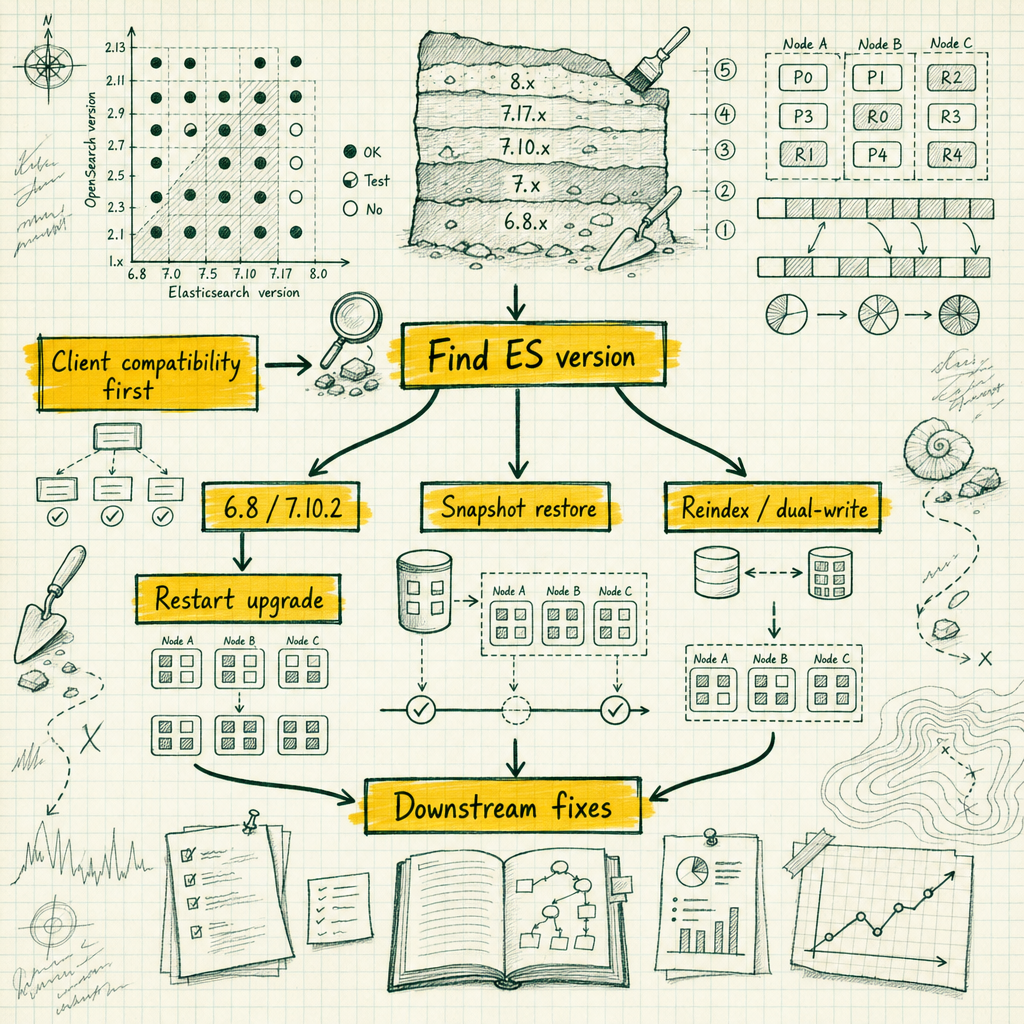
Most people arrive at this migration for licensing reasons. Elastic relicensed Elasticsearch and Kibana from Apache 2.0 to a dual SSPL/Elastic License model in early 2021, OpenSearch forked from the Elasticsearch 7.10.2 codebase (and Kibana 7.10.2, which became OpenSearch Dashboards), and OpenSearch stayed Apache 2.0. That’s the whole story. I’m not going to litigate whose license is more virtuous. If your legal or procurement team has told you to move, you move, and the rest of this article is about doing it without losing a weekend.
The thing that trips teams up is treating this as a fork swap. It is not. It is a version archaeology exercise. The single most important number in your migration plan is the Elasticsearch version you are actually running, and the second most important number is the creation version of your oldest index. Those two facts determine which migration path is even legal for you. Everything downstream (security config, ILM policies, client libraries) is a consequence of that decision, and every migration I’ve watched go badly went badly because somebody guessed at those numbers instead of asking the cluster.
The decision tree, up front
Run this first, before you read anything else:
curl -s localhost:9200/ | jq '.version'Then find your path:
| Source Elasticsearch version | Available paths |
|---|---|
| ≤ 5.x | No direct path. Reindex on the source into 6.x/7.x-created indices first, then snapshot-restore. Or rebuild from source of truth. |
| 6.0–6.7 | Upgrade in place to 6.8 first, then in-place restart upgrade to OpenSearch 1.x, or snapshot-restore. |
| 6.8 | In-place restart upgrade supported. Snapshot-restore supported. |
| 7.0–7.9 | Upgrade to 7.10.2 first for the in-place option, or snapshot-restore directly (subject to index creation version). |
| 7.10.2 | Everything is available to you. This is the sweet spot for an Elasticsearch 7.10.2 to OpenSearch upgrade. |
| 7.11–7.17 | No in-place upgrade. Snapshot-restore usually works. Reindex-from-remote as fallback. |
| 8.x+ | Reindex-from-remote, dual-write/replay, or rebuild. Nothing else. |
OpenSearch 1.0 supports a direct in-place restart upgrade from Elasticsearch 6.8 and 7.10.2 only. Not 7.11, not 7.9, not “close enough”. And there is no supported in-place or snapshot-restore path from Elasticsearch 8.x at all: the 8.x snapshot format is not readable by OpenSearch, so if you’re on 8.x your options are reindex-from-remote, a dual-write replay, or rebuilding indices from whatever system of record produced them.
My recommendation for the large majority of teams: snapshot and restore into a fresh OpenSearch cluster. In-place upgrades save you hardware and cost you your rollback. That trade is almost never worth it.
Step 0: inventory what you actually have
Do this from the API, not from a wiki page someone wrote in 2022. I have twice seen a “we’re on 7.10.2” claim turn out to be 7.10.2 on the data nodes and 7.13 on a coordinating node someone added during an incident. I’ve also watched a team discover mid-cutover that three nodes were still on 6.8.23 because a patch job had failed silently eighteen months earlier. Hit every node individually behind the load balancer for the version check — don’t trust a single response through a VIP.
# Cluster and build version
curl -s localhost:9200/ | jq

# Per-node versions and plugins (catches the odd node out)
curl -s 'localhost:9200/_cat/nodes?v&h=name,version,node.role,heap.percent'
curl -s 'localhost:9200/_cat/plugins?v'

# Index inventory with sizes and creation dates
curl -s 'localhost:9200/_cat/indices?v&h=index,health,pri,rep,docs.count,store.size,creation.date.string&s=store.size:desc'

# Non-default cluster settings, plus what the defaults actually are
curl -s 'localhost:9200/_cluster/settings?include_defaults=true&flat_settings=true' > cluster-settings.json

# Lifecycle policies and templates you will have to re-author
curl -s localhost:9200/_ilm/policy > ilm-policies.json
curl -s localhost:9200/_index_template > index-templates.json
curl -s localhost:9200/_component_template > component-templates.json

# Existing snapshot repositories
curl -s localhost:9200/_snapshot?pretty
_cat/plugins matters for a specific reason: third-party or X-Pack-only plugins won’t exist on the other side, and you need to know now, not during cutover, which ones have no equivalent. _cluster/settings?include_defaults will also surface things like reindex.remote.whitelist and deprecated settings that can block startup on the new cluster.
Now the gate that actually blocks restores:
curl -s 'localhost:9200/*/_settings?flat_settings=true&filter_path=**.index.version.created' | jqSnapshot restore compatibility is governed by index.version.created, the version the index was created under, not the version of the cluster that took the snapshot. A 7.17 cluster can hold an index created back in 5.6 because it has been carried forward through rolling upgrades, and that index will refuse to restore into OpenSearch 1.x even though the cluster it lives on right now reports 7.17. You will find out at 02:00 during the restore if you don’t check now.
If you find old creation versions, reindex those indices on the source cluster before you snapshot. That converts them to indices created under the current version, and they restore fine afterwards.
Path A: in-place restart upgrade from 6.8 or 7.10.2
I use this only when the cluster is small, the data is reproducible, and someone has vetoed the extra hardware. The mechanics are unglamorous.
Take a snapshot first, to a repository the OpenSearch cluster will never write to — not the same repository the cluster writes to for its regular backup schedule. Then:
# 1. Stop shard reallocation so a restarting node doesn't trigger a rebalance storm
curl -XPUT localhost:9200/_cluster/settings -H 'Content-Type: application/json' -d '{
  "persistent": { "cluster.routing.allocation.enable": "primaries" }
}'

# 2. Stop indexing, flush translog to disk
curl -XPOST localhost:9200/_flush

# 3. Stop the node, swap the package or container image, restore config, start
# 4. Wait for the node to rejoin
curl -s 'localhost:9200/_cat/nodes?v'

# 5. Re-enable allocation, wait for green, move to the next node
curl -XPUT localhost:9200/_cluster/settings -H 'Content-Type: application/json' -d '{
  "persistent": { "cluster.routing.allocation.enable": null }
}'
The config translation is mostly mechanical, but not entirely — check specific settings rather than sed-and-pray. elasticsearch.yml becomes opensearch.yml, and the elasticsearch. prefix becomes opensearch. where a prefix exists:
# elasticsearch.yml
cluster.name: logs-prod
node.name: logs-prod-data-01
path.data: /var/lib/elasticsearch
path.logs: /var/log/elasticsearch
network.host: 10.0.4.11
discovery.seed_hosts: ["10.0.4.11","10.0.4.12","10.0.4.13"]
cluster.initial_master_nodes: ["logs-prod-data-01"]
xpack.security.enabled: true
# opensearch.yml
cluster.name: logs-prod
node.name: logs-prod-data-01
path.data: /var/lib/elasticsearch # reuse the existing data path, deliberately
path.logs: /var/log/opensearch
network.host: 10.0.4.11
discovery.seed_hosts: ["10.0.4.11","10.0.4.12","10.0.4.13"]
cluster.initial_cluster_manager_nodes: ["logs-prod-data-01"]
plugins.security.disabled: falsepath.data is the one setting you leave pointed at the old location on purpose — OpenSearch reads the existing on-disk format from a 7.10.2 or 6.8 node directly, and that’s the entire point of the in-place path.
Environment variables rename too:
- ES_JAVA_OPTS="-Xms16g -Xmx16g"
+ OPENSEARCH_JAVA_OPTS="-Xms16g -Xmx16g"
- ES_PATH_CONF=/etc/elasticsearch
+ OPENSEARCH_PATH_CONF=/etc/opensearch
Two things people miss. First, OpenSearch distributions bundle their own JDK, so your carefully pinned JAVA_HOME pointing at some vendor JDK 11 build is now irrelevant at best and a source of confusion at worst. Let the bundled JDK do its job unless you have a specific reason not to. Second, if you reuse path.data in place (which is the whole point of this path), the moment OpenSearch writes to those data files you have no downgrade. None. Elasticsearch will not open them. That is why the snapshot at step zero is not optional.
Anyone who has run pg_upgrade --link and then realised the old cluster is unusable will recognise the shape of this problem.
This is exactly why I recommend snapshot-restore into a fresh cluster for almost everyone, even when in-place is technically available. In-place saves you the cost of running two clusters side by side for a few days. It costs you your rollback. Save this path for clusters where the data is genuinely disposable or trivially rebuilt — a hot-tier logging index with a seven-day retention, for instance — not for anything where the business impact of getting it wrong is high.
Path B: OpenSearch snapshot restore from Elasticsearch
This is what I recommend for almost everyone. You keep the source cluster running and serving traffic, you build the target cluster clean, and your rollback is “point the load balancer back”.
On the source, if you don’t already have one, register a repository and take a snapshot:
curl -XPUT localhost:9200/_snapshot/migration-repo -H 'Content-Type: application/json' -d '{
  "type": "s3",
  "settings": {
    "bucket": "acme-search-snapshots",
    "base_path": "es-to-os-migration",
    "region": "eu-west-1"
  }
}'

curl -XPUT 'localhost:9200/_snapshot/migration-repo/snap-2026-08-04?wait_for_completion=false' \
  -H 'Content-Type: application/json' -d '{
  "indices": "logs-*,orders,customers",
  "include_global_state": false
}'
Use a dedicated repository for the migration. Do not point the new cluster at the repository your existing SLM/snapshot schedule writes to. Repository metadata is not designed for two clusters writing concurrently, and you will corrupt something eventually.
On the target OpenSearch cluster, install the corresponding repository plugin (the S3 repository plugin ships with OpenSearch distributions but the credentials still need configuring in the keystore), then register the same repository read-only:
curl -XPUT localhost:9200/_snapshot/migration-repo -H 'Content-Type: application/json' -d '{
  "type": "s3",
  "settings": {
    "bucket": "acme-search-snapshots",
    "base_path": "es-to-os-migration",
    "region": "eu-west-1",
    "readonly": true
  }
}'
readonly: true is the important bit. It makes it structurally impossible for the target cluster to write repository metadata while the source is still snapshotting on schedule.
Then restore:
curl -XPOST localhost:9200/_snapshot/migration-repo/snap-2026-08-04/_restore \
  -H 'Content-Type: application/json' -d '{
  "indices": "logs-*,orders,customers",
  "include_global_state": false,
  "index_settings": { "index.number_of_replicas": 0 }
}'
Restore with zero replicas and raise the replica count after the restore completes. It roughly halves the restore wall-clock time on large indices.
Then verify before you call it done. Compare doc counts per index against _cat/indices?v&h=index,docs.count on both sides, and don’t accept “close enough” — a restore that’s short by a few hundred documents on a hundred-million-document index is often a sign of a partial shard failure that got swallowed. Check _snapshot/migration-repo/snap-2026-08-04/_status for shard-level failures before you sign off.
If a restore fails with a message about index version, go back to the index.version.created check. That index needs reindexing on the source first.
Path C: reindex from remote OpenSearch and dual-write cutover
This is your only option from 8.x, and it’s also the right option when you need a genuinely zero-downtime cutover regardless of source version.
reindex.remote.whitelist is a static setting on the target cluster. Static means opensearch.yml and a node restart, not a _cluster/settings call. Plan the restart.
# opensearch.yml on every node of the target cluster
reindex.remote.whitelist: ["es-prod-lb.internal:9200", "es-prod-lb.internal:443"]
Create the target index with your intended mappings and settings first. Reindex does not copy mappings or settings. If you skip this, dynamic mapping will invent something plausible and wrong, and you’ll discover it three weeks later when a keyword field that should have been text breaks a query.
curl -XPOST 'localhost:9200/_reindex?wait_for_completion=false&slices=auto&requests_per_second=2000' \
  -H 'Content-Type: application/json' -d '{
  "source": {
    "remote": {
      "host": "https://es-prod-lb.internal:443",
      "username": "migration_reader",
      "password": "REDACTED",
      "socket_timeout": "60s",
      "connect_timeout": "30s"
    },
    "index": "logs-2026.07",
    "size": 2000,
    "query": {
      "range": { "@timestamp": { "gte": "2026-07-01", "lt": "2026-07-08" } }
    }
  },
  "dest": {
    "index": "logs-2026.07",
    "op_type": "create"
  },
  "conflicts": "proceed"
}'
Notes on that body. slices: auto parallelises the scroll across shards without you hand-tuning a slice count. requests_per_second throttles the write side so you don’t saturate the source cluster’s I/O or the target’s write path while both are live — start conservative and watch the source cluster’s thread pools before you turn it up (you can update the throttle on a running task through the Tasks API). The range filter is deliberate: for time-series data, backfill one window at a time so a failure costs you a retry of one week, not the whole history. Track everything with the Tasks API:
curl -s 'localhost:9200/_tasks?actions=*reindex&detailed' | jq '.nodes[].tasks'
curl -XPOST localhost:9200/_tasks/<task_id>/_cancel
The gotcha that costs people real data: reindex reconstructs documents from _source. If an index has _source excludes configured, or relies on fields that exist only in the index and not in _source, those fields do not survive. Check your mappings for _source excludes before you start, not after.
The dual-write cutover sequence around this:
- Application writes to both clusters. Old cluster remains authoritative for reads.
- Backfill historical data with windowed reindex jobs.
- Compare doc counts per index, per day.
- Flip reads behind a feature flag, one service or one percentage at a time.
- Soak.
- Stop dual-write, decommission.
OpenSearch client compatibility with Elasticsearch
This is the section to read if you read nothing else. It causes more post-migration incidents than everything else combined, and it has nothing to do with the cluster itself.
Elasticsearch client libraries from 7.14 onward perform a product verification check against the cluster on first request and refuse to operate against non-Elastic distributions. The failure mode is not a friendly error. On one migration I was involved in, a Python service running elasticsearch-py 7.14 came up after cutover and every single request failed with an unsupported product error. The service’s own health check only hit /healthz, which didn’t touch the search cluster, so the pods stayed green in the orchestrator while returning empty result sets to users for eleven minutes. On another, a team cut a cluster over cleanly on a Saturday morning, watched cluster health go green, declared victory, and got paged at 9am Monday because every service still running a 7.14 client was silently rejecting all traffic against a cluster that was, from the server’s perspective, working perfectly. Nobody had thought to check the client version because “we didn’t change the client.”
Three remediation options, in order of how much I’d trust each one:
1. Migrate to the official OpenSearch clients. These exist for every language you’re likely to care about: opensearch-py, opensearch-java, opensearch-js, opensearch-go, opensearch-ruby, opensearch-php, opensearch-dotnet. The APIs are close enough to the 7.10 Elasticsearch clients that most migrations are an import rewrite and a constructor change. This is the actual fix, and it’s the one workstream fully within your control, decoupled from every cluster-side decision above — start it in parallel with migration planning, not after.
# before
from elasticsearch import Elasticsearch
es = Elasticsearch(["https://search.internal:9200"], http_auth=("svc", pw))

# after
from opensearchpy import OpenSearch
os_client = OpenSearch(
    hosts=[{"host": "search.internal", "port": 9200}],
    http_auth=("svc", pw),
    use_ssl=True,
    verify_certs=True,
)
2. Pin to an Elasticsearch client older than 7.14. 7.10.x or 7.12.x work. This is a holding action for services you can’t touch this quarter, and it’s technical debt with compounding interest — every month you stay pinned is a month further from security patches on that client.
3. Set compatibility.override_main_response_version to true on the cluster. This makes the root endpoint report a 7.10.2 version string so legacy clients pass their check.
curl -XPUT localhost:9200/_cluster/settings -H 'Content-Type: application/json' -d '{
  "persistent": { "compatibility.override_main_response_version": true }
}'
My position: option 3 is a bridge, and bridges get decommissioned. Set it if you need it on cutover day, then put a dated ticket against it. Every cluster I’ve seen where this setting became permanent turned into a cluster where nobody could confidently answer “what actually talks to this thing.” Do the client migration properly, service by service, before you touch the cluster. Clients first, cluster second, always.
Security: X-Pack does not come with you
None of your X-Pack security configuration transfers. Not partially, not with some manual patching. Users, roles, role mappings, all of it gets re-authored from scratch. Budget real time for this, especially if you have field-level or document-level security rules that grew organically — this is the section of the migration most likely to be underestimated because it looks like a config copy and is actually a from-scratch rebuild.
The OpenSearch Security plugin is bundled and enabled by default in OpenSearch distributions, and it stores configuration in a system index (.opendistro_security by default). You don’t write to that index directly, and you don’t configure it primarily through an API. You author YAML files and push them:
internal_users.ymlroles.ymlroles_mapping.ymlaction_groups.ymltenants.ymlconfig.yml(authc/authz backends: LDAP, SAML, OIDC, basic)
Practically: export your role and user list from X-Pack as documentation, not as a config file to import, because there’s nothing to import. Passwords in internal_users.yml are bcrypt hashes generated with the bundled hash.sh:
/usr/share/opensearch/plugins/opensearch-security/tools/hash.sh -p 'correct-horse-battery'Then upload the whole config directory:
/usr/share/opensearch/plugins/opensearch-security/tools/securityadmin.sh \
  -cd /usr/share/opensearch/config/opensearch-security/ \
  -icl -nhnv \
  -cacert /etc/opensearch/certs/root-ca.pem \
  -cert /etc/opensearch/certs/admin.pem \
  -key /etc/opensearch/certs/admin-key.pem
Keep those YAML files in version control from day one. The system index is the runtime state; the repo is the source of truth. Treating it the other way round means your security config lives only inside a cluster you might have to rebuild.
Certificates: the security plugin needs a transport-layer certificate set (node certs plus an admin cert). If you were using X-Pack TLS, you can often reuse the same CA, but the admin cert is a new concept and you’ll be generating it.
ILM to ISM migration: the translation table
Index Lifecycle Management has no import path. ISM (Index State Management) models the same problem differently: named states containing actions, with explicit transitions between them, rather than ILM’s fixed hot/warm/cold/delete phases with min_age thresholds. You’re rewriting policies, not importing them, and there’s no automatic translator worth trusting.
ILM:
{
  "policy": {
    "phases": {
      "hot":    { "actions": { "rollover": { "max_size": "50gb", "max_age": "1d" } } },
      "warm":   { "min_age": "7d",  "actions": { "forcemerge": { "max_num_segments": 1 } } },
      "delete": { "min_age": "30d", "actions": { "delete": {} } }
    }
  }
}
ISM:
{
  "policy": {
    "default_state": "hot",
    "ism_template": [{ "index_patterns": ["logs-*"], "priority": 100 }],
    "states": [
      {
        "name": "hot",
        "actions": [{ "rollover": { "min_size": "50gb", "min_index_age": "1d" } }],
        "transitions": [{ "state_name": "warm", "conditions": { "min_index_age": "7d" } }]
      },
      {
        "name": "warm",
        "actions": [{ "force_merge": { "max_num_segments": 1 } }],
        "transitions": [{ "state_name": "delete", "conditions": { "min_index_age": "30d" } }]
      },
      {
        "name": "delete",
        "actions": [{ "delete": {} }],
        "transitions": []
      }
    ]
  }
}
Same intent, different shape. min_age becomes a transition condition rather than a phase property, and the state machine is explicit. Walk your ILM policies one at a time, rewrite by hand, test on a throwaway index pattern with a short min_index_age, and confirm transitions actually fire before you trust it with production retention.
The wider translation table:
| Elastic feature | OpenSearch equivalent | Reality check |
|---|---|---|
| ILM | ISM | Rewrite policies by hand, different schema |
| Watcher | Alerting plugin | Different model: monitors, triggers, destinations. Re-author every alert |
| Kibana | OpenSearch Dashboards | Forked from Kibana 7.10.2 |
| Saved objects | NDJSON export/import | Works well from Kibana 7.10.x exports, degrades from later versions |
| Beats / Logstash | Keep them, or Data Prepper | Beats and Logstash can output to OpenSearch; Data Prepper is the first-party option |
| Machine learning / anomaly detection | Anomaly Detection plugin | Different algorithms, not a config migration |
| Canvas, some SQL surface | Partial or absent | Check per feature, do not assume parity |
On Dashboards: export saved objects as NDJSON from Kibana and import them. If you’re on Kibana 7.10.x this is usually clean. If you’re on Kibana 7.17 or 8.x, expect breakage, especially with index patterns and newer visualisation types. Plan to re-create index patterns manually and treat the NDJSON import as a starting point rather than a guarantee. Be honest with your team about what has no equivalent at all rather than discovering it during an import that silently drops half your saved searches. Do this early. Dashboards being broken on Monday morning is what makes a technically successful migration feel like a failure.
Verification: prove it, don’t assert it
Green cluster health is not verification. Write a script. Commit it. Run it before cutover, after cutover, and again after the soak period — you’ll run it again the next time you patch either cluster, and the next engineer shouldn’t have to reconstruct it from a Slack thread.
#!/usr/bin/env python3
"""verify_migration.py — run against source and target, diff the output."""
import json, sys, requests

SRC = "https://es-prod.internal:9200"
DST = "https://os-prod.internal:9200"
GOLDEN = json.load(open("golden_queries.json"))  # list of {name, index, body}

def counts(host):
    r = requests.get(f"{host}/_cat/indices?format=json&h=index,docs.count")
    return {i["index"]: int(i["docs.count"]) for i in r.json()
            if not i["index"].startswith(".")}

def mappings(host, index):
    return requests.get(f"{host}/{index}/_mapping").json()[index]["mappings"]

def golden(host, q):
    r = requests.post(f"{host}/{q['index']}/_search", json=q["body"]).json()
    return {
        "total": r["hits"]["total"]["value"],
        "ids": [h["_id"] for h in r["hits"]["hits"]][:20],
        "aggs": r.get("aggregations", {}),
    }

fail = 0
s, d = counts(SRC), counts(DST)
for idx, n in sorted(s.items()):
    got = d.get(idx)
    if got != n:
        print(f"COUNT MISMATCH {idx}: src={n} dst={got}")
        fail += 1

for idx in sorted(set(s) & set(d)):
    if mappings(SRC, idx) != mappings(DST, idx):
        print(f"MAPPING DIFF   {idx}")
        fail += 1

for q in GOLDEN:
    a, b = golden(SRC, q), golden(DST, q)
    if a["total"] != b["total"] or a["ids"] != b["ids"]:
        print(f"GOLDEN DIFF    {q['name']}: src={a['total']} dst={b['total']}")
        fail += 1
    if a["aggs"] != b["aggs"]:
        print(f"AGG DIFF       {q['name']}")
        fail += 1

sys.exit(1 if fail else 0)
Compare doc IDs and ordering, not _score values. Scores will differ between clusters if analyzer implementations, Lucene versions, or shard counts differ — and they often do even between a 6.8 source and its OpenSearch target — and chasing a fourth-decimal-place score delta will eat a day for no benefit. What matters is that the same documents come back in the same order for your top-N.
Capture a latency baseline on the source before cutover: p50, p95, p99 for your five most common query shapes, measured from the application side. Without it you cannot answer “is the new cluster slower?” with anything better than vibes.
Cutover runbook with rollback gates
Gates are named so that anyone on the bridge call can say “we’re failing gate 3” and everyone knows what that means.
Gate 1 — Clients ready. Every service that talks to search is running an OpenSearch client or a pinned pre-7.14 Elasticsearch client, verified against a staging OpenSearch cluster. Rollback: trivial, nothing has changed in production. Do not pass this gate on the strength of a dependency file. Check the running artefact.
Gate 2 — Target cluster built and verified. Snapshot restored or backfill complete, security config uploaded, ISM policies applied and tested, Dashboards saved objects imported. verify_migration.py exits zero. Rollback: delete the target cluster.
Gate 3 — Dual-write on (Path C) or final snapshot restored (Path B). Writes hitting both clusters, error rate on the new write path under threshold for 30 minutes. Rollback: turn off the secondary write.
Gate 4 — Read cutover behind a flag. 5% of read traffic, then 25%, then 100%, with the latency baseline as the pass criterion. Rollback: flip the flag. This is your last cheap exit.
Gate 5 — Soak. 48 hours minimum, ideally across a full weekly cycle so batch jobs and weekend traffic patterns are exercised. Dual-write stays on. Rollback: flip reads back, still cheap.
Gate 6 — Decommission. Stop dual-write, retain the source cluster in a stopped state with its snapshots for at least 30 days. Point of no return.
Explicit rollback triggers, agreed before the window: error rate above 0.5% on search endpoints for five consecutive minutes; p99 latency above 2x baseline for ten minutes; any doc count divergence above 0.01% on a primary index; any authentication failure affecting more than one service.
For Path A, note that your point of no return arrives at gate 3, not gate 6 — the moment the first node starts under OpenSearch and writes to the data files, back at the beginning of the in-place sequence. Once that’s happened, restore-from-snapshot into a rebuilt Elasticsearch cluster is your only way back, and that is a multi-hour operation, not a flag flip. Rehearse it or don’t choose Path A. Path B and Path C, by contrast, keep the source cluster untouched until you deliberately decommission it, which means you can delay that decision as long as budget allows — a fundamentally safer risk profile that’s worth weighing against the hardware savings of going in-place.
What I’d do differently
Four things, all learned expensively.
Migrate the clients before the cluster. The product check in 7.14+ clients is the most common cause of a “successful” migration that pages you an hour later. Client work is boring, parallelisable, and can happen weeks ahead against a staging cluster. Do it first.
Snapshot to a separate repository. Sharing a repository between the old and new cluster to save on S3 costs is a false economy that ends with corrupted repository metadata and a very quiet conference call. Separate bucket path, readonly: true on the target, done.
Treat Dashboards as a deliverable, not a footnote. Nobody outside your team measures this migration by cluster health. They measure it by whether their dashboard loads. Export saved objects early, import into a staging OpenSearch Dashboards instance, and get the actual dashboard owners to click through them before cutover week.
Run the audit from the API. Every incorrect assumption in every migration I’ve been part of came from someone’s memory of the cluster rather than the cluster’s own answer. GET /, GET _cat/nodes?v&h=name,version, and GET */_settings?flat_settings=true&filter_path=**.index.version.created. Three calls. They determine your entire plan. Run them again the morning of cutover, because clusters change while you’re writing runbooks about them.
If you’d rather have someone run this playbook against your cluster than build it yourself, that’s the kind of migration work MyDBA handles end to end.