Upgrade Elasticsearch Without Downtime: A Rolling Runbook
You can upgrade Elasticsearch without downtime if you treat it as a rolling upgrade with a hard health-check gate, not a single cutover. Script the process so a non-green cluster response stops everything cold, no exceptions. Move rack by rack or AZ by AZ so allocation awareness always keeps a live copy of every shard somewhere. Budget two nights for the roll and plan on running mixed-version overnight — that’s a supported state, and rushing through it is how a routine upgrade becomes an incident.
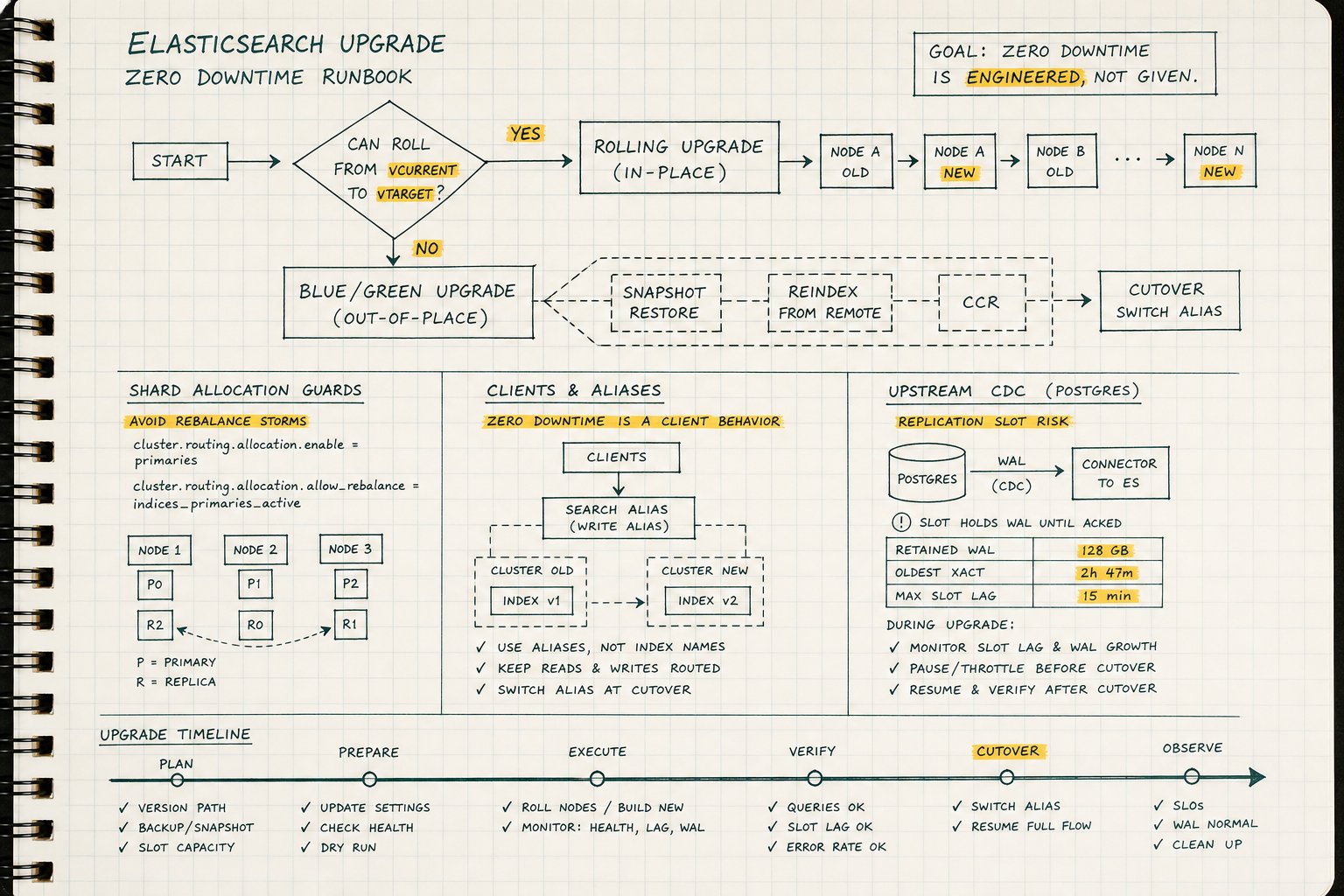
Elastic Cloud and ECK handle the node-by-node choreography well, and if you’re running either, take the gift. But neither one reindexes your old indices, migrates your Transport Client, or notices that your CDC connector is quietly pinning WAL on the Postgres side. The orchestration was always the easy part.
The runbook skeleton
Paste this into the change ticket and put a name against every phase.
T-3 weeks: audit everything
Start by running GET _migration/deprecations alongside the Upgrade Assistant, and log every finding — don’t triage on the fly later. Then inventory your indices by creation version; anything two majors old needs a reindex, a rebuild, or an honest decision to archive it. This is the point where you decide which indices actually need reindexing before the upgrade, not during it.
Do the same inventory exercise for clients, exporters, and scrapers, confirming library compatibility and sorting out credentials and TLS if the jump crosses into 8.x — this matters most on an Elasticsearch 7.17 to 8.x upgrade, where security defaults and client APIs shift underneath you. Close the window by restoring a production snapshot into a container running the target version and throwing your full application test suite at it. If something’s going to break, this is where you want to find out.
T-1 week: lock the plan
Nail down the version path — rolling, two-hop, or blue/green — and book maintenance windows around that decision, not the other way around. If you’re weighing an Elasticsearch blue-green migration against a straight rolling upgrade, decide now: blue/green buys you an easy rollback but costs double the infrastructure and a cutover step you still have to get right.
Audit elasticsearch.yml across every node and strip out cluster.initial_master_nodes; it has no business surviving into the new cluster. Confirm the plugin versions you need for the target release actually exist and are staged ahead of time. Capture latency and throughput baselines now, while the cluster is still behaving normally, so you have something to compare against later.
And settle the Postgres slot strategy: hold WAL with real headroom, or drop the slot and plan to rebuild. Whichever you pick, write down max_slot_wal_keep_size and the free space on the WAL volume — you’ll want both numbers in the room when things get tense. If you’re already watching replication health with something like MyDBA, keep that dashboard open next to the cluster status through the whole window.
T-0, before the first node
Confirm the cluster is green and every node is under 75% disk before you touch anything. Take a snapshot, and don’t just take it — verify it restores. This is your rollback snapshot; treat it as useless until you’ve proven a restore works. Enable ML upgrade mode with POST _ml/set_upgrade_mode?enabled=true, stop Watcher, and pause ILM/SLM. Raise index.unassigned.node_left.delayed_timeout to 10 minutes so a brief node absence doesn’t trigger unnecessary shard movement. Open the Postgres slot dashboard next to _cat/health and leave both visible for the duration.
Per-node rolling steps
Repeat this sequence for every node, in order:
- Set
cluster.routing.allocation.enabletoprimaries. - Flush with
POST _flush. - Stop the node, upgrade its binaries and plugins, and start it back up.
- Confirm it rejoined cleanly with
GET _cat/nodes?v&h=name,version. - Reset
cluster.routing.allocation.enableback to null. - Wait for green with
GET _cluster/health?wait_for_status=green&timeout=5m— green or you stop, full stop.
Check your abort criteria again before moving to the next node. Every time. This is the mechanical core of any Elasticsearch rolling upgrade, and it’s also the part that’s hardest to shortcut without paying for it later.
After the last node
Re-enable ML, Watcher, ILM, and SLM. Reset delayed_timeout to whatever your standing value is. Verify a snapshot completes successfully on the new version — don’t assume, confirm. Resume or rebuild the CDC pipeline and make sure the slot is advancing with wal_status = 'reserved'. Then compare latency percentiles against your baseline and watch the cluster for 48 hours before you close the ticket.
What actually prevents downtime
The parts that make this a genuine elasticsearch zero downtime upgrade are the client inventory, the restore-and-test pass, and the Postgres slot decision. The Elasticsearch commands were always the easy half.
Skip the audit and you’ll find out about it live, mid-window, with a client library that can’t authenticate against 8.x or a WAL slot that’s been pinning disk for six hours while nobody was watching. None of that shows up in _cluster/health.
Where teams actually lose the “no downtime” claim
Nobody misses the zero-downtime mark because a shard failed to relocate. They miss it because a scraper choked on a breaking API change, or a replication slot ran the WAL volume dry three hours into the window, or the rollback snapshot turned out to be untested and useless exactly when it was needed. The rolling mechanics — flush, stop, upgrade, rejoin, wait for green — are well-trodden and Elastic’s tooling handles them reliably. What separates a clean upgrade from an incident report is the work done in the weeks before: the client inventory, the restore-and-test rehearsal, and a Postgres slot strategy that’s decided on paper instead of improvised at 2 a.m. Do that homework and the cutover itself is almost anticlimactic.